


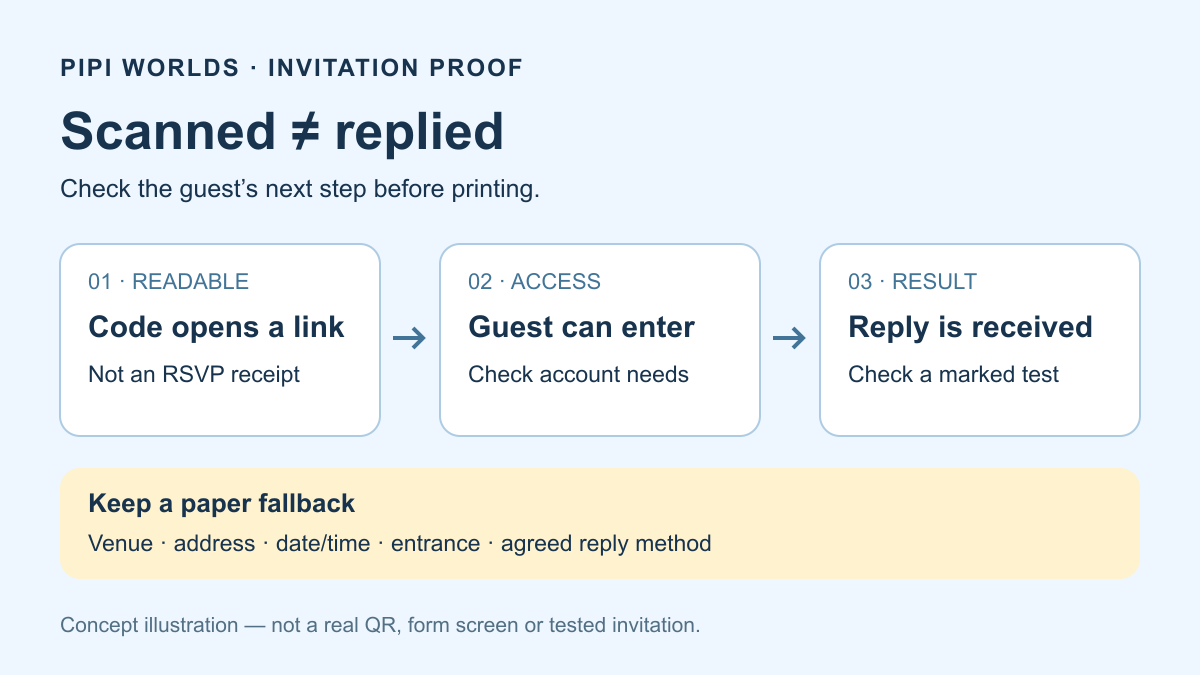
The code scans. The guest still cannot RSVP. That can happen when the invitation points to an editor link, the form needs an account the guest does not use, or nobody checked what happens after pressing Submit. A readable image is the beginning of a guest path, not its completion.
This guide helps you proof an invitation you control. It is not a report of a tested wedding or a promise that guests will reply, arrive or upload photos. A QR is optional: keep the important details and an agreed response method on paper.
Start with the guest’s next action
Decide whether the guest needs to reply, find the entrance or see photos. Do not add all three just because a QR generator exists.
One static URL QR stores one address. A wedding webpage can offer several clearly labelled links, but our free URL QR generator does not host a wedding site, make a form, collect replies or set album permissions. Separate destination codes are another choice; each needs its own label and proof.
For a paper fallback, leave room for the venue name, street address, date, time, entrance instructions and a contact/reply method you intend recipients to receive. An optional short web address can help someone who cannot scan. Do not add a home address, private number or guest list merely to fill the design.
Three failures a successful scan can hide
These are hypothetical decisions, not checks of your invitation or private accounts. Choose what you would do before opening the explanation.
The page works in my account. A guest sees “request access”.
Stop before printing. Confirm that you copied the responder or visitor link, not an editor link, and test the audience you actually intend. Keep necessary access restrictions: do not make private content public just to remove the prompt. If a guest cannot use the required account, give them a separate agreed reply method.
The form opens. Nobody has checked the reply result.
An open page is not a submission test. With the organizer’s permission, use a clearly marked test response, check the confirmation and verify that the organizer received it. Remove the test through that form’s normal workflow. Do not enter real guest details into a public tutorial or assume a visible Submit button proves delivery.
The phone has no connection at the venue.
A QR does not supply mobile data or make an online form work offline. Keep the arrival details on paper and agree an alternative reply/contact method in advance. A printed address without the relevant entrance or time can still leave a guest stuck.
RSVP: proof the responder path, not your editor view
Google’s current Forms instructions distinguish publication and responder access. Get the responder link, not the form-editing address. An unpublished form is not available to responders simply because you copied a URL.
The Limit to 1 response setting requires Google Account sign in. Check the actual account/access requirement with an intended guest, without removing a restriction you need. Keep a fallback for people who cannot use it.
Also review View results summary: Google says it exposes full-text responses or charts to people who can respond. Do not enable it blindly for a guest list or personal answers. Our suggested proof is a permitted, clearly marked test submission, its confirmation, and the organizer’s receipt—not a measurement of response rate. Other RSVP services have different settings; these are not universal instructions for them.
Directions: prove the entrance, not just a map opening
Google Maps documents sharing places, maps and directions. Its computer instructions distinguish a copied link from embed HTML. Obtain the share link for the intended place or route; a QR generator does not correct a misplaced pin.
From the actual guest path, check the venue name, address and relevant entrance. Check the next directions action, not merely that Maps appears. App or browser handling depends on the phone and its settings. We did not test guests’ phones or a real venue. Keep arrival details on paper for someone who cannot open the link.
Photos: prove viewing and adding separately
An album QR does not decide who should see your photos. Agree what may be shared with the people pictured before distributing it. In Google Photos’ link controls, a link can be forwarded; removing a person does not close access while link sharing stays on. Turning link sharing off and on resets it: the old link stops working, but a printed static QR keeps its old address.
Check viewing and adding as different tasks. Collaboration controls and stopping sharing explain additions and access. Stopping sharing does not erase downloaded or copied photos. Do not treat later removal as permission to publish unapproved pictures now.
Google Photos on Android offers a native QR for an album. If that meets your need, you do not need our generator. A custom layout does not change sharing rights. Test the intended viewer and uploader paths in their actual account/phone conditions; do not promise every guest can contribute. We did not operate an album account.
A reusable guest-path proof
Use the blank worksheet below as a paper note or copy it from the article. No signup, event information or guest details are requested here. Keep private account links and real answers out of the worksheet. Not checked is not a pass.
Wedding guest-path proof
Status for each item: Not checked / works / needs correction
[ ] Guest access: correct visitor/responder link and intended account requirements
[ ] RSVP confirmation: marked test reaches the organizer through the agreed workflow
[ ] Venue entrance: name, address, date, time and correct entrance checked
[ ] Paper fallback: arrival details and an agreed reply/contact method remain usable
[ ] Album: intended audience, viewing and adding checked separately if included
[ ] Actual print: final size, stock, trim, margins, light and intended phone checked
[ ] Retest date: decide when and who rechecks links before distribution and the event
Do not write guest names, answers, private URLs or account credentials here.
Repeat it after changing a destination or permissions, not just when the image file changes. You can Save for later above and reopen this guide from your saved articles. The browser list is not a deadline reminder or a guest-management service.
Print proof: no universal size or color pass
DENSO WAVE calls for a four-module quiet zone on every side. Keep decoration and trimming outside it. Printed module size and reader resolution matter: a total width such as 20 mm is not a universal minimum. Data length and the final material also matter. The tool’s screen preview or SVG file is not a tested invitation.
DENSO WAVE’s color advice starts with black on white and testing other colors. W3C’s 4.5:1 criterion is for normal text, not a QR scan threshold. Our displayed color ratio is a reference, not certification.
Codeword restoration, described by DENSO WAVE, is approximately L/M/Q/H = 7/15/25/30%. These are not promised percentages of printed surface you can damage. Raising error correction can enlarge the symbol; at a fixed overall width, smaller modules can create a different print trade-off. Test the final physical proof, then continue through access to the intended next action. No printer, paper or guest-phone matrix was tested for this guide.
Once you have a suitable URL and an intended audience, prepare that URL in the free tool. It encodes the address you supply; it does not certify the destination, grant access, host the page or confirm a reply. If a link later changes, the separate QR maintenance guide explains what an embedded payload and a same-address webpage change mean.
This English guide was independently prepared with AI writing assistance and primary-source checks, not translated from the Japanese guide or reviewed by a human event/print specialist. The cover is a nonfunctional guest-path illustration, not an actual form, QR or wedding result. Legacy artwork and exports remain withheld from outbound republication.