


You planned to buy one $40 item. A second $20 item is half off. Did you save $10, get 16.67% off, or spend $10 more? All three statements can be true. The first compares two-item prices; the second divides the saving by the original two-item total; the third compares checkout with your original one-item plan.
The useful first question is not “Which formula do I remember?” It is “Compared with what?” Write down that base before you press a calculator button.
Choose the question before the formula
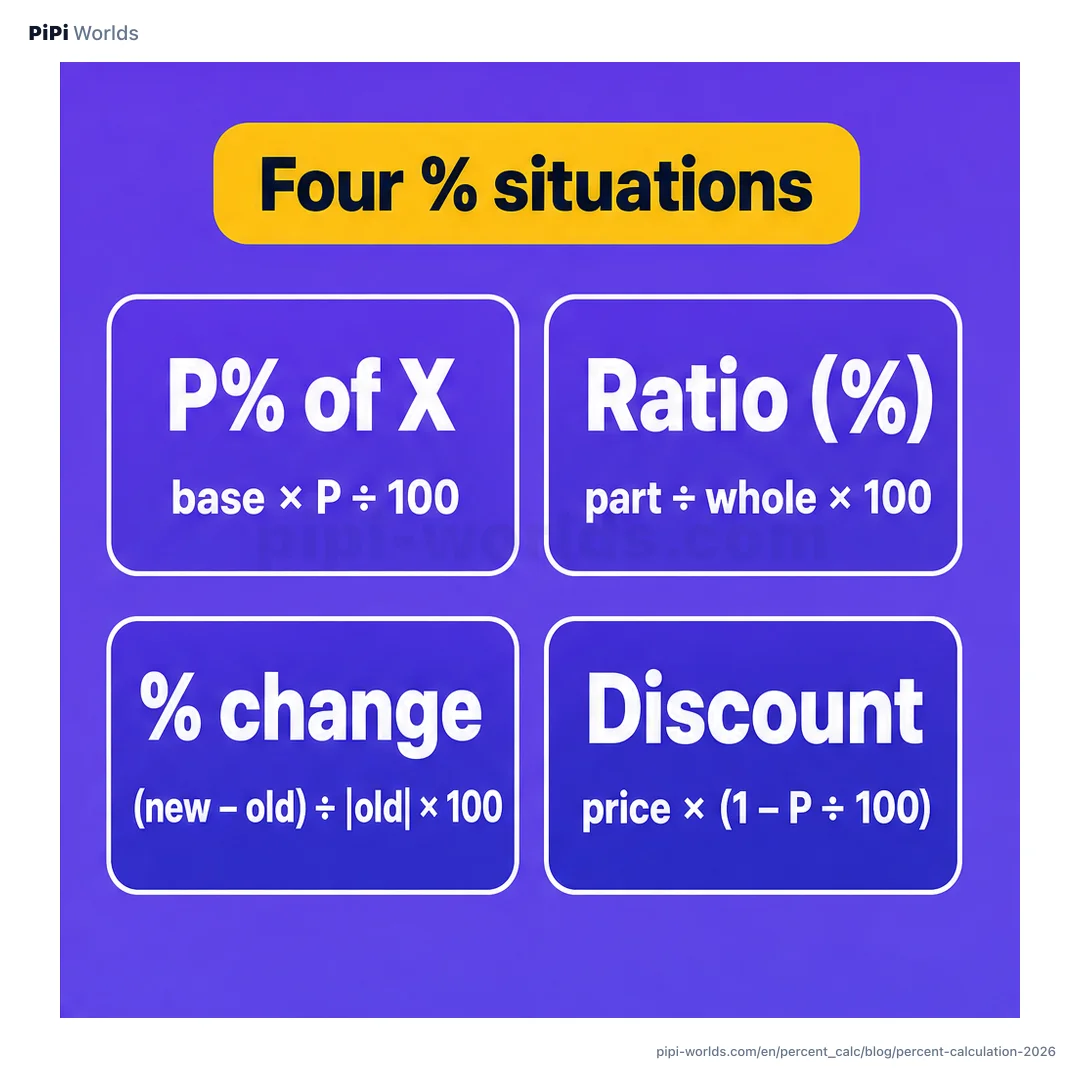
| What you want to know | Base to write down first | Example | Calculator tab |
|---|---|---|---|
| How much is P% of X? | The amount X | 18% of $48 is $8.64 | X% of Y |
| How large is one value relative to another? | The whole or goal | 120 completed ÷ 100 planned = 120% of goal | Ratio (%) |
| How much did a value change? | The starting value | $200 to $150 is a 25% decrease | Change % |
| What is the price after one markdown? | The price before that markdown | 30% off $100 leaves $70 | Discount |
These four questions are a starting map, not a claim that every percentage problem has exactly four formulas. The percent calculator also has Increase/Decrease, Add tax, Remove tax, and Margin/Markup tabs. Pick a tab for the question you are answering, not for whichever number has a percent sign beside it.
A result above 100% is not automatically a mistake
A ratio is the compared value divided by its chosen base. If you complete 120 tasks against a target of 100, the result is 120% of goal: you exceeded the target by 20%. Saying that any ratio over 100% is nonsense confuses a share of a fixed whole with progress against a goal. A physical part cannot be larger than the whole it belongs to, but an actual result can be larger than its target.
The order still matters. 120 ÷ 100 = 120% of goal; 100 ÷ 120 ≈ 83.33% answers a different question—how much of the actual result the original goal represents. If the base is zero, neither a ratio nor a percentage change from that base is defined. The calculator leaves those results blank rather than inventing a percentage.
A rate can move by points and by percent
If a rate changes from 3% to 4%, the difference is 1 percentage point. Relative to its starting value of 3%, the same move is (4 − 3) ÷ 3 × 100 ≈ 33.33%. These are not competing estimates; they use different units and answer different questions.
For an ordinary positive starting value, percent change is the new value minus the old value, divided by the old value. For example, $200 falling to $150 is (150 − 200) ÷ 200 × 100 = −25%. The Bureau of Labor Statistics’ CPI explainer uses that earlier-value denominator for positive index values. Our tool uses the absolute value of the starting number when it is negative so the sign still reads as direction; that is a tool convention, not a claim about BLS methodology or every subject area. A zero starting value remains undefined.
Two coupons use two different price bases
Take a hypothetical $100 item at 30% off, then a further 10% off the reduced price. The first markdown leaves $70; the second takes $7 off $70, leaving $63. Relative to the original $100, that is 37% off, not 40%.
The Discount tab applies one markdown to the price you enter. To check this example, enter $100 and 30%, then enter its $70 result and 10%. There is no dedicated stacked-coupon mode. Real coupons may exclude marked-down goods, use a different order, or round at checkout. Verify the terms and final charge rather than assuming the two offers combine.
This also explains why a “second item half off” banner cannot tell you what you saved on an entire cart—or whether you spent less than you planned. In our $40 + $20 example, half off the $20 item saves $10 on a $60 pair, or 16.67% of the pair; paying $50 is also $10 more than the one $40 item you meant to buy. For the full comparison and an interactive two-price card, read The second item is half off. Your cart is not.. Its offer is fictional and assumes the cheaper eligible item is discounted; a real promotion can work differently.
Reverse an included percentage; do not subtract it again
Suppose a hypothetical $110 price already includes a 10% tax. The pre-tax amount is $110 ÷ 1.1 = $100, and the included tax is $10. Subtracting 10% of $110 instead gives $99, because it takes a percentage of the wrong base. The Remove tax tab performs the division. It does not decide whether a real price includes tax, what jurisdictional rate applies, or how a seller rounds cents.
Even flawless arithmetic cannot establish that an advertised “regular” price was genuine. The FTC’s Guides Against Deceptive Pricing discuss bona fide former prices (§ 233.1) and clear terms for conditional bargain offers (§ 233.4). They do not certify any particular store’s banner. Check the offer conditions and the checkout total before deciding whether the deal is worth buying.
Use the calculator for the number; choose the comparison yourself. The tool runs calculations in your browser. Its visible Copy page link button copies the page address only; it does not include your inputs or calculation result. The recipient must choose the calculator tab and enter their own numbers. The button removes query parameters and section anchors. Manually copying an old input-bearing URL from the address bar is different: opening that address can send its values in requests or logs, so do not share sensitive amounts.
What changed on October 9
The two worked answers now appear before artwork and the optional Save for later controls. We rechecked their arithmetic and official-source boundaries, kept the four-formula graphic, and retired four unused stand-alone share-card files. The original publication date is unchanged.
What changed on October 12
We corrected the sharing instructions in this article and the tool FAQ to match the visible Copy page link action. This is a correction to the description, not a new result-sharing feature. The October 9 arithmetic and external-source review dates remain unchanged.